
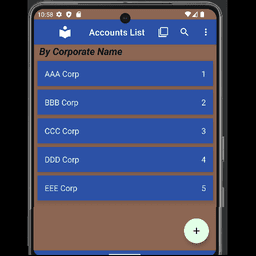
Screenshots
About Accounts List
Manage your accounts locally with Accounts List, the secure account organizer that puts you in complete control—no sign-in required. Keep sensitive account information organized on your device with optional cloud backup, giving you flexibility without forced registration.
Stay organized with customizable account lists. Sort your accounts by corporation name, account ID, or open date—whatever makes sense for your workflow. Add new accounts with the plus icon, edit existing ones with the pencil icon, and use the powerful search feature to instantly locate any account. Bookmark your most-used accounts for lightning-fast access whenever you need them.
Choose the password management method that fits your security needs. The manual method lets you store only your account ID in the app while keeping passwords secured separately—perhaps written down in a safe place or stored in another secure location of your choosing. Prefer more convenience? Use the encrypted storage method to keep passwords directly within the app. Your passwords are encrypted and can only be viewed when you enter your chosen passphrase, adding a strong layer of security.
Generate strong passwords whenever you need them using the built-in password generator. Create complex combinations with numbers, symbols, and capital letters that are easy to type. Accept suggested passwords or delete them and try again until you find one you like.
Backing up your account data is simple and entirely optional. Export your accounts in JSON format directly to your own Dropbox account whenever you want an extra copy. Restore your data anytime from that backup—all authorization happens securely through Dropbox, never within the app itself. You maintain full control of your backup data.
Your privacy matters. Accounts List stores everything locally on your device by default. No registration required, no user accounts created, no tracking. Your data only leaves your device if you actively choose to back up to Dropbox, and even then, you control every aspect of that process through your own Dropbox account.
Take charge of your account management with Accounts List—secure, local, and entirely in your hands.
Pros & Cons
Pros
- No sign-up required; full functionality without account creation
- Local storage by default keeps your sensitive data on your device
- Optional Dropbox backup gives you flexibility without forced cloud sync
- Built-in password generator creates strong, complex passwords on demand
- Customizable sorting and bookmarking help organize accounts by your workflow
Cons
- Passwords stored in encrypted app storage require remembering a separate passphrase
- Manual password management method offers no built-in secure password storage
- No iOS or desktop version limits account access to Android devices only
- Backup and restore depend entirely on your Dropbox account integration
Frequently asked questions about Accounts List
Is Accounts List safe to download?
A malware scan report for this version of Accounts List is not available on Unstore yet. Only install files from sources you trust and keep your device's security protection turned on.
What are the system requirements for Accounts List?
Accounts List runs on Android. It requires Android 12L or later. The download size is 28.6 MB.
What is the latest version of Accounts List?
The latest version of Accounts List on Unstore is 21.3. It was last updated on May 22, 2026.
Who develops Accounts List?
Accounts List is developed by VonnieKinsey.
Related Apps

HWiNFO
Hardware monitoring for Windows—track CPU temp, GPU load, fan speed, voltage in real time.

TransMac
Read Mac drives and DMG files on Windows. Access APFS/HFS+ storage and create disk images.

Advanced SystemCare Free
System optimization tool: clean, repair, and secure your PC. Remove malware, fix errors, and boost performance.

Display Driver Uninstaller (DDU)
Driver uninstaller for GPU and audio — removes residual files for clean Windows updates

Glary Utilities
PC maintenance and optimization suite — clean, repair, and speed up your Windows computer in one action.

Universal ADB Drivers
ADB drivers for Android: Connect any smartphone to Windows PC without manufacturer software.
Latest Articles

Play a free Color Ball Sort Puzzle-style game in your browser (no download)
Oct 6, 2026

Play a free Beach Buggy Racing-style kart racer in your browser (no download)
Oct 6, 2026

Play a free Alto's Adventure-style game in your browser (no download)
Oct 6, 2026

Free online whiteboard like Jamboard: use Quickboard in your browser, no signup
Oct 6, 2026

Free online running pace calculator: splits, race predictor and daily challenge, no download
Oct 6, 2026